
Full stack developer, educator & CEO CRIB, LLC
Introducing: CribOS
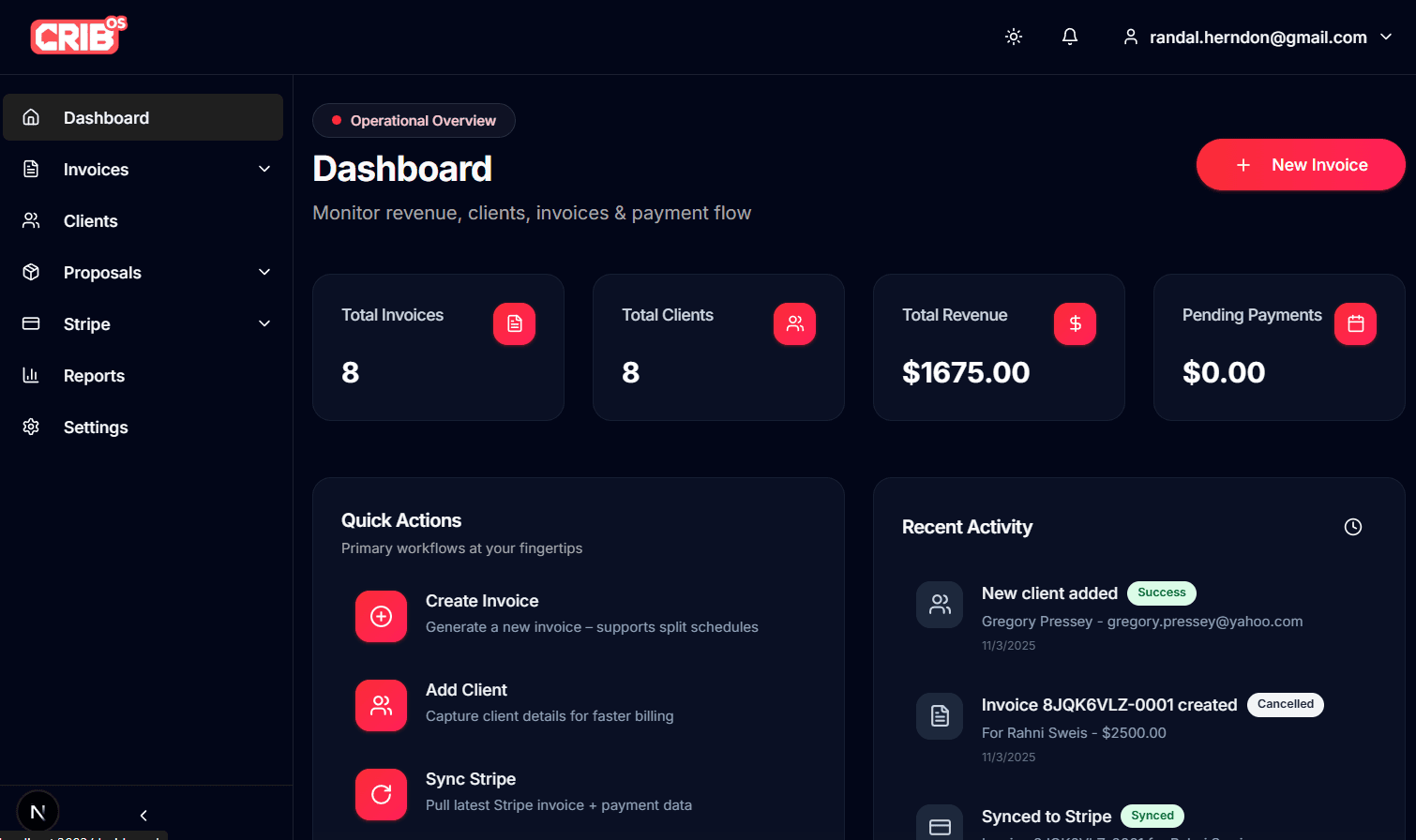
Client work, handled.
Simple CRM for small businesses & creators
Managing client work shouldn’t feel like juggling flaming torches. But for most small businesses, boutique studios, and creators, the day-to-day reality looks more like a scattered mix of Dubsado, Google Sheets, email threads, calendar links, contracts stuck in PDFs, and invoices buried somewhere in Stripe.
Projects slip because someone forgot a follow-up. Proposals stall because the draft is still “in progress.” Scheduling becomes a volley of “Does Thursday work?” messages. And invoices? They get sent late because everything needed to send them lives in different tabs.
All of this context switching drains your time—and your energy. Instead of focusing on client outcomes, you’re playing tool Tetris, stitching systems together, and hoping nothing breaks.
CribOS exists to end that.
A simple CRM built for the way modern creators work
CribOS is a clean, integration-first CRM designed for people who don’t have time for bloated software or 40-step setup processes. It’s the system small teams have been asking for: easy to onboard, easy to use, and easy to keep organized.
Instead of stringing together separate apps for proposals, scheduling, invoicing, reminders, and client communication, CribOS brings everything together—without heavy features you’ll never use.
You get fewer clicks. Clearer workflows. More projects moving forward. More green checkmarks that mean success.
This isn’t a copy of Dubsado. It’s a simpler, faster alternative intentionally built for small teams, solo operators, and creative studios who want a unified place to manage client work from first contact to final invoice.
What makes CribOS different?
Most tools still treat creators like project managers. CribOS treats you like someone who wants to get work done—not spend your day configuring automations.
We built CribOS around three principles:
1. Everything in one place
Client info, proposals, tasks, files, scheduling, invoices, and messages—unified and searchable.
2. Integration-first
Google Calendar, Gmail, Stripe, Shopify, Notion, Tessitura, custom adapters, and more—connected out of the box.
3. Fewer steps → faster outcomes
Proposals convert automatically to projects. Contracts sync instantly. Invoices generate without leaving the workflow. Clients get one simple portal.
This is CRM without the clutter.
Feature Deep Dive
Below is a look at the core features that make CribOS a true Dubsado alternative, intentionally scoped for simplicity.
### Client CRM
CribOS gives you a clean, organized home for every client and company record.
- Contacts, companies, addresses, and custom fields
- Notes, files, timelines, and internal comments
- Unified activity: proposals sent, tasks completed, invoices paid
- Lightning-fast search across your entire client base
No more digging through old emails or random docs.
### Proposals & Contracts
Turn “I’ll send that over later today” into instant action.
- Beautiful, on-brand proposals
- Built-in e-signatures
- Automatic conversion into projects
- Contract + invoice + kickoff tasks generated in one flow
CribOS removes the friction between “yes” and “let’s start.”
### Scheduling (Google Calendar CRM integration)
Say goodbye to scheduling ping-pong.
- Simple booking pages
- Auto-reminders
- Real-time sync with Google Calendar
- Availability pulled directly from your schedule
Clients pick a time. You show up. That’s it.
### Automations
Small, powerful, IFTTT-style rules that move work forward.
- When proposal is signed → create project
- When project starts → generate checklist
- When invoice is overdue → send reminder
- When form is submitted → notify team + create contact
Automation is where CribOS stays clean: no complex builder, no clutter—just actions that quietly keep you moving.
### Client Portal
A client portal your clients will actually understand.
- Deliverables
- Messages
- Files
- Invoices + payment history
- Project status
One login, one hub, zero confusion. It’s modern, minimal, and clearly structured—more intuitive than Dubsado’s portal, especially for non-technical clients.
### Pipelines & Tasks
A simple visual pipeline to keep your work flowing.
- Drag-and-drop Kanban boards
- Lead pipeline + project pipeline
- Task checklists
- Status indicators with “green = success” semantics
Whether you’re tracking inbound leads or in-progress work, you always know where each project stands.
### Invoices & Payments
Built for the flexible ways creators bill.
- One-click invoice creation
- Payment schedules
- Split billing
- Mobile-friendly checkout
- Stripe-powered payments
Send invoices in fewer steps—and get paid faster.
### Forms & Intake
Make onboarding feel seamless.
- Branded forms that match your site
- Conditional logic
- Instant routing into CribOS
- Form submissions automatically create client records or update existing ones
From inquiry to onboarding, CribOS keeps everything flowing.
Integrations
CribOS connects with the tools small businesses already depend on. Each integration includes a one-line value unlock:
- Stripe — Collect payments instantly and securely
- Shopify — Sync customers + order details into CribOS
- Google Calendar — Real-time scheduling + availability
- Gmail — Log conversations + send communications from CribOS
- Notion — Push project notes or sync documentation
- Tessitura — Manage contacts, membership records, or donor info
- Custom Adapters — Connect CribOS to any internal or external system
Integration-first means less copy/paste, fewer errors, and workflows that actually stay in sync.
Why not Dubsado?
Dubsado is powerful. But for many small teams, it’s too powerful—layered with features they don’t need, steps they don’t understand, and automations that require days of setup.
CribOS is for people who want speed, clarity, and fewer moving parts.
When you’d pick CribOS instead of Dubsado:
- You want an easier setup (hours—not days).
- You want fewer clicks to send proposals and contracts.
- You want a cleaner, more intuitive client portal.
- You want native integrations with modern tools.
- You want simpler automations you can set up in minutes.
- You want a CRM that feels lightweight, not overwhelming.
Comparison: Dubsado vs CribOS
FeatureDubsadoCribOSSetup TimeComplex, days/weeksSimple, hoursClient Portal UXFunctional but datedClean, modern, friendlyAutomationsPowerful but steep learning curveSimple IFTTT-style rulesIntegrationsLimitedIntegration-first platformProposal → Project ConversionManual in many casesAutomaticSchedulingAdequateReal-time Google Calendar syncUsabilityFeature-heavyLightweight + fast
CribOS is designed to reduce—not increase—your operations workload.
Customer Vignette: A Day in the Life
Meet Jamie, a one-person creative studio who builds websites and branding for small businesses.
- A prospect fills out Jamie’s CribOS intake form.
- CribOS instantly creates a new lead and notifies Jamie.
- Jamie sends a proposal with contract + payment schedule.
- The client signs; CribOS auto-creates the project, kickoff tasks, and files.
- Jamie drops a link to the client portal, where the client can see timelines and deliverables.
- The client books their kickoff call via Google Calendar sync—no emails needed.
- Each milestone triggers automated reminders and progress updates.
- Jamie sends a final invoice with Stripe checkout.
- The client pays immediately from the portal.
Everything flows. Everything stays green.
Getting Started With CribOS
CribOS is intentionally easy to adopt—whether you're coming from Dubsado, a spreadsheet, or a collection of notes.
Onboarding
You’ll work with a workflow specialist who helps:
- Map how your business currently operates
- Recreate your workflows inside CribOS
- Connect Stripe, Gmail, Google Calendar, and other integrations
- Build initial proposals and templates
Imports
CribOS supports:
- Client imports
- Company imports
- Pipeline imports
- Intake submissions
- Dubsado CSV migrations
Just upload your file and preview before finalizing.
Time-to-Value
Most teams start running client work in under 48 hours.